

Update: The all-new Glorify is officially out of BETA after two 🥳 To celebrate this milestone on this Black Friday, they’re offering 1000 lifetime deals up for grabs for a limited time. ➤ Get the Glorify lifetime deal now. Pay once and use lifetime!
Glorify now is really fast and bugs-free and they’ve added a lot of features like AI tools, mockups, video, batch editing, a revamped, intuitive Infinite Canvas experience, and a lot more.
You all must have heard about Canva – the graphic design tool for everything. But do you know any e-commerce-focused design tools? You’ll say no because there aren’t any.
Now, you may find some baseline tools that offer basic features like adding shapes, text, stock photos & graphics, image filters, customizing colors, logos, and images, picking pre-made templates, resizing canvas, cropping, mask images, etc. But they all are missing essential tools that will enhance how any product is presented online which can improve the CTR(Click-through rate) and conversions.
Glorify App (2.0)
Recently, I stumbled upon GlorifyApp on ProductHunt and I was pretty impressed by the product. Glorify, lets you create high-converting beautiful product images with just a few clicks. Well, not just images, you can also create marketing materials, eBooks, Logos, social media graphics, and much more, without any design skills or learning curve!
So, in this article, we’re going to dive into the recently launched Glorify app designing tool. How this graphic designing tool is different from existing tools like Canva, Crello, etc.. We’ll also get to know how this tool can help e-commerce sellers, Instagram influencers Funnel Hackers, and Drop-shippers in increasing profit, sales, and conversions with the power of conversion-driven product images.
First, have a look at the below video to see how easily you can create a stunning product image using Glorify.
Best Features of the Glorify
Create Stunning Product Images Within minutes
I’ve used Canva a lot of times but I must say with Glorify I can create any type of design pretty fast. I’ll tell you, how fast it’s. Just choose your favorite template from the ever-growing library, add your product, brand it with your own color palette, edit text select your desired font from their library, add a background, or use effects to give it a great look.
Quick Easy Effects for a Pro Look.
As of writing this, they have three essential effects – One-Click Background Remover (a feature that’s missing from Canva), Shadows, and reflections. Have a look at below gif(s) below to understand these effects better.
One-Click Background Remover

Shadows Effect

Reflections Effect

Annotate Tool to show Important Features of the Product
Now, I think this is an important feature for the product images. Customers can easily get to know about the important product features and that’s something which improves the CTR & conversions.

Inbuilt Logo Maker
Have to created a cool logo for your new Shopify Store? Use Glorify’s inbuilt logo maker. Now, obviously, it can’t replace a logo designed by a professional logo designer but hey it’s okay to go with a simple and nice logo in the starting. To design a logo, just enter your brand name, and select keywords to describe your brand so that it can recommend colors to go with. Once you select your preferred colors, select your icons from hundreds of free icons and tweak a bit to get your perfect logo.
Smart Resizer for your Design
Smart resizer is my favorite tool which lets you resize the same design to any social media format. Take a look at the below gif to know how it works. Don’t worry, it will take care of all social media platforms’ photo dimensions automatically.

Looking for Design Inspiration?
Many times we don’t get a proper design idea. But not now, thanks to Glorify’s huge library of designs categorized according to niche and themes. For example, if you’re an Instagram Influencer creating a cool design for the beauty product you’re promoting then just select the ‘beauty niche’ and you will get hundreds of design ideas as templates.

Glorify is best for?
- E-Commerce Sellers: The Glorify app is the perfect product image-designing tool for all online sellers, no matter what you’re selling and on which platform. It supports right from Amazon, Shopify, and Woo-commerce to all other online platforms. Using Glorify’s unique features and templates you can increase profit, sales, and conversions with the power of conversion-driven product images.
- Instagram Influencers: Instagram influencer industry is booming and if you’re one of the Influencers, try Glorify today for your product images and improve your engagement and sales.
- Funnel Hackers: Using Clickfunnels, Leadpages, Unbounce or Instapage to sell irresistible offers through captivating sales funnel? Glorify is for you.
- Drop-Shippers: As drop-shipper are you constantly testing different product opportunities? Create powerful product marketing on steroids using Glorify.
- And Everyone?: I personally think, Glorify app is not just for e-commerce but anyone can use this graphic designing tool to create high-quality professional images that can be used in their online campaigns, social media, blogs, ebooks, ads and what not?
If you want to compare Glorify with Canva, check our Glorify App Vs Canva article.
Glorify App Pricing & Lifetime Deal?

Glorify is a Saas (Software As A Service) cloud-based graphic designing software that follows the subscription-based model (monthly recurring billing) which used to start from $12.99 per month (billed as one bill per month) or $120 for a year for the basic Pro Plan But for the limited time this season, they’re offering another LTD (Lifetime Deal) on their new Glorify 2.0 where you can get 93% Discount on all plans. Read on to check their plans, pricing and comparison. Glorify Lifetime deal ends on 20th August 2026.
GlorifyApp was the ‘Product of the Day‘ on August 27, 2026, and the community has shown a great interest in the product. The team behind Glorify is very responsive, they actually listen and make the changes in the product if required. Actually, they’ve launched Glorify 2.0 after listening to the community for more than 1 year. Check their public roadmap here. I’ve noticed they’re adding cool features and templates every week. There’s also a YouTube channel managed by them where you can check all the Glorify tutorials + there’s also a Facebook community where you can interact with the team and other Glorify users.
Now, Did I tell you, you also get Free Creative assets which include millions of stock photos, hundreds of product image templates, social media templates, icons, fonts, and much more.
Note: Glorify App Lifetime Deal is ending on 20th August. Make sure you take benefit of this LTD and grab this amazing tool by just paying a one-time fee. No monthly subscription. Click here to know more about Glorify LTD.
Glorify has three plans – Pro Plan Solo, Pro Plan Startup, and Enterprise Plan. Let’s compare them and see their pricing.
| Features | Glorify Pro – Solo | Glorify Pro – Startup | Glorify Business |
| 50 background remover credit per month. | 150 background remover credits per month. | Unlimited background remover. |
| 1 Brand/Client Account | X3 Brands/Clients Accounts | Unlimited Brands/Clients Accounts |
| Premium Stock 10 credits pm | Premium Stock 30 credits pm | Premium Stock 100 credits pm |
| ✓ | ✓ | ✓ |
| ✓ | ✓ | ✓ |
|
1X Logo Maker, Color Palettes, Custom Fonts. | 10xLogo Maker, Color Palettes, Custom Fonts. | ∞ Logo maker, Color Palettes, and Custom Fonts. |
| ✓ | ✓ | ✓ |
| ✓ | ✓ | ✓ |
| 1 user. | 3 Users [Including Owner] |
10 Users |
| ✓ | ✓ |
✓ |
| Priority Support | Priority Support |
Priority Support |
| Lifetime Deal Pricing (Get 93% Discount) | $97 one-time | $197 one-time |
$397 one-time |
| Get Plan Now > | Grab Glorify Pro – Solo Plan | Grab Glorify Pro – Startup Plan | Grab Glorify Enterprise Plan |
What are Stacks on Glorify App 2.0?
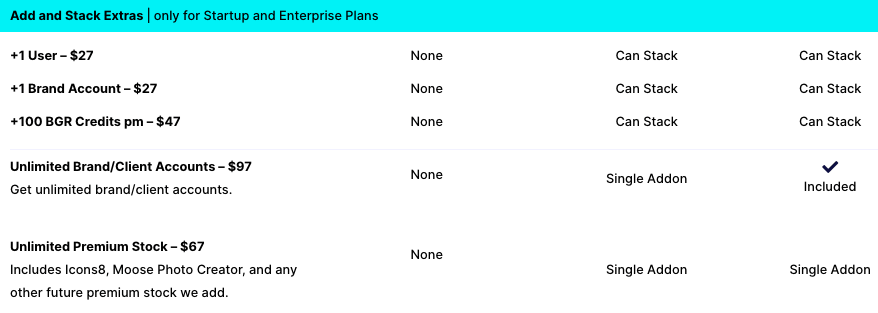
You must be seeing ‘Can Not Stack Addons’ in the SOLO Plan that basically means you can not add extra features, BG credits, and sharing capabilities like Unlimited Brands/Clients accounts, Premium Stock Photos, adding new users, etc. Kindly refer to the below screenshot for all the addons.
Which Glorify Plan should you buy?
First and foremost, I would recommend grabbing their LTD deal as this is the last time they’re offering their plans on more than a 90% discount. Post this Lifetime deal, as usual, you need to pay a monthly subscription price.
Second, If you’re someone who does a lot of Graphic Designing, Established E-Commerce seller, Dropshipper, or someone who’s running an agency offering your Graphic Designing and E-commerce Product designing services then do grab the Business or Enterprise Plan. In the Business plan, you get all features of GlorifyApp pro + unlimited background removal credits + 10 members sharing + Icons8 giving you live models, backgrounds, objects, and of course 100,000+ premium icons directly in your account.
If you’re a small team or business that doesn’t require mass design production or someone who needs a better alternative to Canva for your day-to-day Graphic Designing then do grab their Pro Startup Plan. If you’re on a tight budget and a freelancer, do grab their solo plan.
Kindly keep the staking add-ons in mind, you can’t stake add-ons in the Solo Plan.
FAQs
Glorify App Vs Canva: Which is best?
We’ve written a separate article comparing both the Graphic Designing tools, u003ca href=u0022https://www.latestonnet.com/glorify-app-vs-canva/u0022 target=u0022_blanku0022 rel=u0022noreferrer noopeneru0022u003echeck it out hereu003c/au003e.u003cbr/u003e
How can I grab the Glorify App FREE trial?u003cbr/u003e
Go to this u003ca href=u0022https://www.latestonnet.com/go/glorifyu0022 target=u0022_blanku0022 rel=u0022noreferrer noopener sponsored nofollowu0022u003eGlorify app trial page u003c/au003eand enter your details. There’s no credit card required.u003cbr/u003e
Can I upgrade/Downgrade my Glorify subscription?
Yes, you can do that anytime by going to your dashboard u003e Account Settings u003e Change Plan.u003cbr/u003e
What’s the difference between Glorify Pro u0026amp; Business Plan?
The u003cstrongu003ePRO planu003c/strongu003e is mostly for solo entrepreneurs or businesses that don’t require mass design production While theu003cstrongu003e BUSINESS plan u003c/strongu003eis recommended for larger businesses that require more collaboration and design assets. For more details, check their pricing plans at u003ca href=u0022https://www.latestonnet.com/go/glorify-plansu0022 target=u0022_blanku0022 rel=u0022noreferrer noopener sponsored nofollowu0022u003eglorifyapp.com/pricing-plansu003c/au003eu003cbr/u003e
Do I have to be a designer to use glorify?
Nope. Glorify is for everyone! It gives you the perfect balance of being super easy to use for a non-designer, whilst giving enough technical power for a pro designer. Whether you’re a Solo Entrepreneur getting started, or a business with a collaborating team. Whether you are a doer with no design skills or even a designer with more technical tastebuds.u003cbr/u003e
What are Premium Stock Assets?
Glorify includes some stock libraries that are categorized as u0022Premiumu0022. For lifetime deal owners, your monthly credits will depend on the plan or add-ons you purchase.u003cbr/u003eCurrently, premium stock libraries consist of:u003cbr/u003e u003cbr/u003eIcons8 – Stylized Iconsu003cbr/u003eIcons8 Photo Creator – models, backgrounds, objects that compose seamlessly together.u003cbr/u003eu003cbr/u003eIn the near future, they have plans to include more premium stock libraries ranging from Glorify proprietary stock as well as new 3rd party integrations such as: u003cbr/u003eu003cstrongu003eFlaticonu003c/strongu003eu003cbr/u003eu003cstrongu003eOuch! by Icons8u003c/strongu003eu003cbr/u003eu003cstrongu003eIconscoutu003c/strongu003e.u003cbr/u003eu003cbr/u003eAs a lifetime deal owner, any future premium stock libraries will be included as per your plan.u003cbr/u003e
Do you get Commercial rights?
Yes, almost all the media on Glorify App can be used free for commercial and non-commercial use.u003cbr/u003e
When is Glorify Lifetime deal ending?
20 August 2026.
Also Check: Copy.ai Review – Best Copywriting AI tool today?
Glorify App Vs Canva?
Confused between Glorify App and Canva? Do check out Glorify App Vs Canva article where I’ve compared both the Graphic Design tools and suggested which one should you buy?
If you’re a Canva free user and planning to upgrade to Canva Pro then I would recommend checking my Canva Pro Review.
Hope you like this in-depth review of Glorify App. Do let me know if you’ve any questions regarding Glorify? Also, let me know if you’re using any other tool for all your Graphic Designing needs?
Also Check: Canva Pro Honest Review: Is it worth upgrading in 2026?



Leave a Comment